
Using AI for Creative Exploration + A Framework and Claude Skill For Going Beyond the Obvious
A practical way to use AI for ideation: map your creative process, explore ideas deeper, and a Claude Skill for early concept exploration.

A guide to using AI in early creative thinking, the phase before any output gets made. Covers what stays yours in creative work and what AI can take over, how to map your own creative process before adding AI, the 4 themes where AI fits in creative work, and Idea Studio: a framework and Claude skill that turns any concept into structured exploration. The skill is available to paid subscribers at the end of the article.

The Creative Space
Before you generate anything there's the early thinking, the messy space before any output gets made. Your creative space.
Maybe you have a theme to explore, a new direction you want to take. Maybe you’re building a brand for a client, exploring a visual concept, or comparing possibilities to see which one wants more attention.
This space feels dreamy and open, or it feels messy and pressured. Either way, the decisions made here shape everything that follows. It’s the room where an idea is still open.
It’s an experience you live, and it’s not something you can rush or replace with a prompt.
Creativity is the act of staying with uncertainty long enough for a meaningful connection to appear.
AI + The Creative Process
Since I started using AI in my design process, I’ve been thinking about how to bring it into this earlier creative phase, not only for building and generating final outputs, but for exploration and thinking.
The goal: make AI useful without poisoning my creative flow.
Before deciding when and how to use AI, I had to recognize two things: my own superpowers as a human, and AI's superpowers as a tool.
What stays yours:
Your expertise and unique life experience
The relationship with the world, people, and the work
Empathy and emotions
Your intentionality
Your judgment and decisions
Cultural context and nuances
Sensory memory and embodied knowledge (how materials feel in the hand)
Your instinct
What AI can help with:
Researching across many fields
Taking concepts apart
Comparing across domains
Holding many angles at once
Role-playing different perspectives
Stress-testing assumptions and asking questions
Translating an idea into other mediums (a brand as a meal)
Synthesizing piles of notes and references into something readable
Brainstorming under constraints (”what if you could only use 3 colors?”)
Know Your Process, Then Bring AI In
I had to revisit my creative process and my way of thinking. Here's what I noticed:
When I have an idea, I start by exploring what it means technically, physically, metaphorically, emotionally, across cultures, and across time. Basically I stay with it and stretch it until I find interesting unique angles.
Then I start capturing research from observation, going deeper into specific themes, what other people have written, what others have made. Collecting things from the internet, books, articles, a conversation, a film I saw years ago.
I start taking notes, building moodboards, making connections, sketching ideas, visualizing scenarios, and mapping everything to the goals of the project.
Then I pause and sleep on it. I allow reflection and revisit everything to see if I feel the same way about everything.
I refine and decide.
This exercise surfaced 4 core themes where AI can play a role:
Exploration: taking concepts apart, holding many angles at once.
Research: cross-domain searches at speed.
Synthesis: turning notes into something readable, comparing options side by side.
Reflection: role-playing perspectives, stress-testing assumptions.
Your turn: catch your creative moves!
Before adding AI to your process, observe how you already think. Your process, the steps you take, your principles, your approaches. Write them down.
Then look for the places where AI could support the process without taking it over.
AI nurtures creativity when you stop asking it to generate final outputs and start asking it to dissect.
I Built a Room for Exploration: The Idea Studio
After mapping my own process, I wanted a way to make this kind of exploration easier to return to without turning it into a rigid formula.
I didn’t want another prompt that generates a list of ideas.
And I wanted it to make my AI think more visually, and not come back with a huge block of text.
So I built Idea Studio: a framework and a Claude skill I could use across my projects.
What is Idea Studio?
Idea Studio is a thinking skill. It dissects a concept underneath the brief, looks at it from different perspectives, sparks new relations between concepts, finds the tensions inside it, and surfaces the sensory, philosophical, and conceptual questions it carries. You reach for it when you want to go underneath the obvious before sketching, naming, or committing to a direction.
It is a Claude Skill built around my creative exploration framework.
What are Claude skills?
Skills are folders of instructions, scripts, and resources that Claude loads dynamically to improve performance on specialized tasks. Skills teach Claude how to complete specific tasks in a repeatable way. More About Skills
How It Works
Idea Studio is built for the moment before the work becomes clear. You can use it for creative concepts, brand concepts, digital products, websites, naming, positioning, visual directions, product narratives, landing pages, or strange early ideas that need more time before they become something concrete.
It moves the idea through 5 stages of exploration: underneath the brief, into tension, across perspectives, into sensory and visual territory, and finally toward a clearer next decision.
The output is something to think with: concepts, tensions, references, visual cues, and open questions that help you see what the idea is carrying before you decide what to make from it.
The five stages are:
Concepts: what is underneath the brief.
Collisions: what happens when those concepts meet each other.
Perspectives: the idea seen through five lenses:
Exploration: what else the idea could become.
Critique: where it fails or hides something.
Philosophical: the deeper question it is asking.
Creative: fresh angles and unexpected combinations.
Research: linked, verifiable references to traditions, makers, books, and works.
Layers: palette, symbols, sensory territory, and tensions.
Landing: the takeaway and what to carry into the next decision.
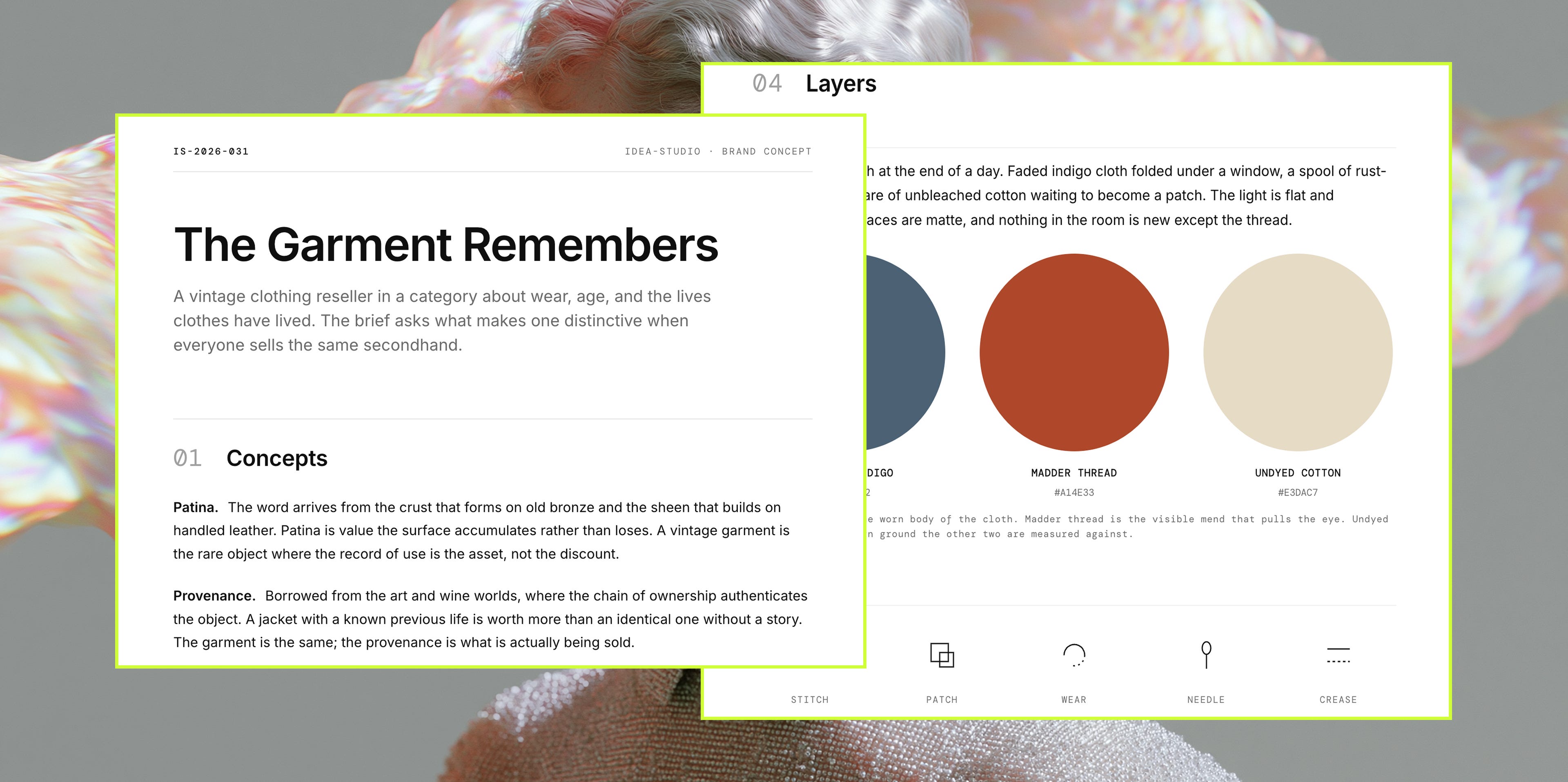
What You Get
Each run gives you a complete exploration artifact:
A structured exploration of your concept/idea
A 3-color palette tied to the concept, with each color named and given a role.
5 symbol marks that carry the concept visually.
3-5 tension axes holding the productive oppositions surfaced in the exploration.
3-5 open questions for what’s worth carrying forward.
Inline preview in chat for quick overview and quick actions (in Claude)
A visual artefact (HTML) that you can keep, compare, and come back to later.
You walk away with a richer first layer for your creative process: angles you might not have thought to search for, references outside your usual path, and connections that spark something new.
A few habits that keep ideation yours!
Don't use AI to think for you but with you.
Let AI stretch the idea beyond your first instinct.
Treat names and references as leads. Triple-check for accuracy.
When the answer sounds obvious, push further.
Follow what inspires you. Cut what doesn’t.
Your taste shows up in what you choose.
